

Plesk is a server control panel. You rent a server from someone else, install Plesk on it, and then manage sites, domains, mail, databases, certificates and WordPress through a browser instead of through SSH. It is one of the two names everyone lands on in this category, the other being cPanel.
It is also a per-server licence that renews automatically by default. That makes one thing about the current pricing page more serious than it looks: every price card on it carries the line “Regular price XX€ /mo”, with the placeholder left unfilled. Sitting directly beneath is a notice that “effective January 1, 2026, license subscriptions will be subject to a revised pricing structure which will affect all renewals subsequent to that date.”
So the page tells you a renewal repricing is coming, and then declines to say what the regular price is. This guide works out what Plesk does cost today, what each edition actually unlocks, and which parts of the published pricing you should confirm in writing before you turn on auto-renew.
Quick Picks
| If you are… | Edition | Listed price | Why |
|---|---|---|---|
| Running your own handful of sites | Web Admin | 12.04€/mo | Up to 10 domains, but it is a single-admin panel with most management features removed |
| A freelancer or agency with client sites | Web Pro | 18.29€/mo | Up to 30 domains, full WP Toolkit, subscriptions and account management |
| Reselling hosting to customers | Web Host | 31.38€/mo | The only edition with reseller management and no domain cap |
| Unsure whether you will stay on a VPS | Any, dedicated licence | Higher | A dedicated licence runs on both dedicated and virtual servers. A VPS licence does not |
| Mainly here for WordPress management | Web Pro | 18.29€/mo | Web Admin only gets WP Toolkit SE, the cut-down edition |
| Needing DNSSEC or PostgreSQL and MSSQL | Web Pro | 18.29€/mo | Both are paid add-ons on Web Admin and included from Web Pro up |
| A hosting company or large reseller | Partner programme | See below | 15 to 45 percent off, but the page states the minimum two different ways |
| Just evaluating | Free trial | Free | Two weeks, fully functional, no credit card |
How I Checked This
Everything here comes from Plesk’s own pricing page, edition comparison table and FAQ, read on October 23, 2026. The edition table was parsed out of the page markup rather than read off the rendered text, because the include, exclude and add-on markers are lazy-loaded icons that do not survive a text copy, and getting one wrong would misstate what an edition contains.
I have not installed Plesk on a server for this article, so there is no performance verdict here and nothing below is a test result. This is an analysis of what the company publishes about its own editions and prices, which turned out to be the interesting part.
One limitation worth stating plainly. The pricing page has two separate price blocks and toggles for Dedicated against VPS and Monthly against Yearly, and those toggles are driven by scripts. I could not determine from the page source which combination a visitor sees by default, so I have reported the figures as they appear and said where each one sits rather than presenting any of them as the single current price.
What the Pricing Page Says, and Why That Is Awkward
Four problems, and they compound.
1. The regular price is a placeholder
Every one of the six price cards on the page reads “Regular price XX€ /mo”. Three of them then say “XX€ starting Jan 1, 2025” and two say “XX€ starting Jan 1, 2022”. The placeholders were never replaced. On a product sold as a discounted first term that then renews at a regular rate, the regular rate is the number that matters most, and it is the one the page does not contain.
2. The same editions appear at two different prices
The page carries two complete pricing blocks. The first lists Web Admin at 12.04€/mo, Web Pro at 18.29€/mo and Web Host at 31.38€/mo. The second lists the same three editions at 6.60€, 9.90€ and 16.50€. Each card in both blocks is labelled VPS.
I could not establish which block a visitor is shown, and I am not going to guess. What I can say is that the lower block carries the “starting Jan 1, 2022” placeholders, which suggests it is the older of the two. Treat the higher set as the one to budget against and confirm the figure in the checkout before you commit.
3. Dated notices that have long since passed
Underneath the cards: “Limited time offer applicable only to new purchases. Valid until December 1, 2025.” That date passed almost eleven months ago and the offer is still displayed. Next to it, the repricing notice is still written in the future tense about January 1, 2026, which is also in the past.
4. The partner minimum is published twice, at double
This one is unambiguous, because both statements sit on the same page. The Business Plans card says the entry point is a “Monthly Minimum of only €250 / $250”. The FAQ further down says “The minimum commitment starts at 500$/month”.
Those cannot both be right, and the gap is a factor of two. If you are considering the partner route, that is the first thing to get confirmed by email.
None of this means the software is bad. It does mean the pricing page is not currently a reliable document, and since licences “purchased in our Online Store have automatic renewal enabled by default”, the sensible move is to note what you are charged at checkout, diary the renewal date, and keep the confirmation email.
What Each Edition Actually Unlocks
This is where the real decision is, and the edition names are not very descriptive. Parsed from the comparison table:
| Feature | Web Admin | Web Pro | Web Host |
|---|---|---|---|
| Domains | Up to 10 | Up to 30 | Unlimited |
| Reseller management | No | No | Yes |
| Subscription management | No | Yes | Yes |
| Account management | No | Yes | Yes |
| Cgroups resource manager | No | Yes | Yes |
| Power user view | Yes | Yes | Yes |
| Service provider view | No | Yes | Yes |
| Restricted mode | No | Yes | Yes |
| WP Toolkit | SE only | Full | Full |
| PostgreSQL and MSSQL modules | Paid add-on | Yes | Yes |
| DNSSEC | Paid add-on | Yes | Yes |
| Let’s Encrypt, ModSecurity rules | Yes | Yes | Yes |
| Developer pack | Paid add-on | Paid add-on | Paid add-on |
| Premium Email, email antivirus, email security | Paid add-on | Paid add-on | Paid add-on |
Two things fall out of that table that the price ladder does not suggest.
Web Admin is a single-admin panel, not a small hosting panel. It has no subscription management, no account management, no service provider view and no restricted mode, and its WordPress tooling is the cut-down SE edition. DNSSEC and the PostgreSQL and MSSQL modules are paid extras on top. It suits one person running their own sites on one server. The moment you need to hand a login to a client with limited permissions, you are on Web Pro.
Web Pro and Web Host differ by almost nothing on paper. In the entire published comparison the only functional difference is reseller management, plus the domain cap going from 30 to unlimited. That is a 72 percent price increase, from 18.29€ to 31.38€, for one feature and a cap. If you are not reselling to third parties and you are under 30 domains, Web Host has nothing for you.
And note the add-on column. The Developer pack and the whole Plesk email stack, including antivirus and email security, are paid extras on every edition including the 31.38€ one. If email hosting is part of your plan, none of these prices include it.
The Licensing Detail That Saves Money Later
Plesk licences are per server, and come in VPS and dedicated flavours. From the FAQ: “A VPS license can be installed only on a virtual server. A dedicated license can be installed on a dedicated server or on a virtual server. There is no difference in the features included.”
So the dedicated licence is a superset. It costs more, but it follows you if you move from a VPS to bare metal, whereas a VPS licence does not. If there is any chance of that migration in the licence term, the dedicated licence is the one that survives it.
Per server is also the right unit for this product. The licence does not care how much traffic the box takes, only which edition and how many domains. An agency consolidating thirty client sites onto one Web Pro server pays once.
WP Toolkit Is the Reason Most People Choose Plesk
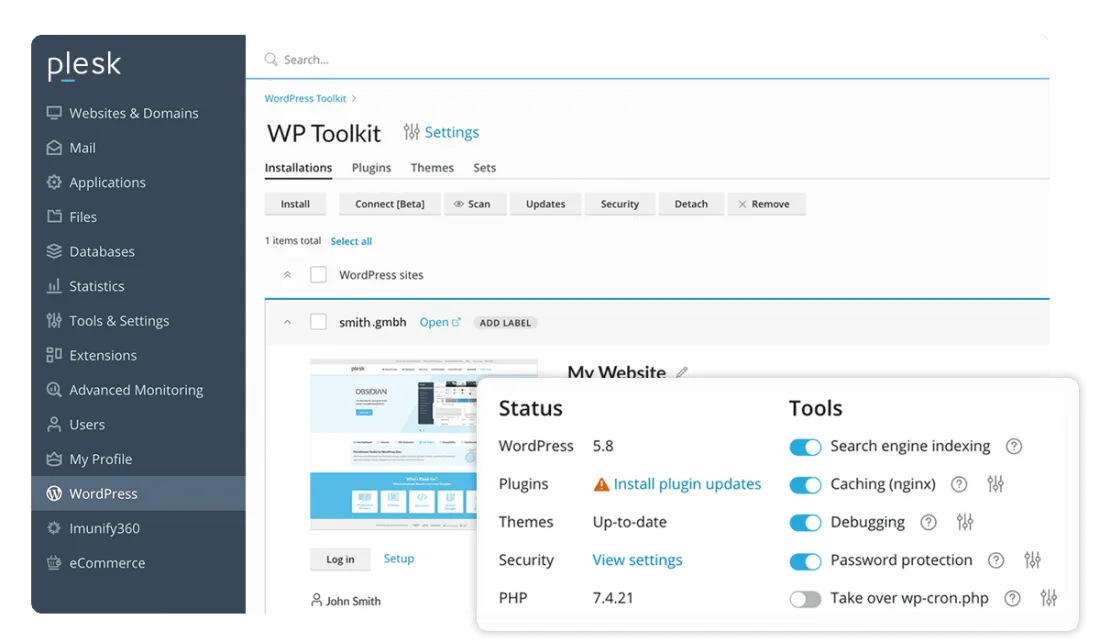
If you manage WordPress sites, WP Toolkit is the strongest argument in the product. It handles installs, staging, cloning, plugin and theme management across every site on the server, bulk updates, and security hardening from one screen, with smart updates that test an update against a clone before applying it.
The catch is the edition split. Web Admin gets WP Toolkit SE, described in Plesk’s own table as the “Limited features edition”. The full version starts at Web Pro. If WordPress management is why you are buying, the 12.04€ edition is not the one you want, and the real entry price is 18.29€.
Who Owns Plesk, and Why It Matters
The footer reads “© 2026 WebPros International GmbH” and “Part of the WebPros® Family”. WebPros is the group that also owns cPanel, along with SolusVM, WHMCS and XOVI. Oakley Capital bought Plesk from the Parallels group in 2017 and added cPanel and SolusVM in 2018.
That is worth knowing because the usual framing of this decision is Plesk against cPanel, as if two rivals were competing for your money. They have the same owner. The practical consequences are mild and mostly about expectations: do not wait for a price war between them, and if you are choosing, choose on the merits of the interface and your operating system rather than on a competitive dynamic that does not exist.
On merits, the short version is that Plesk runs on both Linux and Windows Server and has the stronger WordPress tooling, while cPanel is Linux only and more entrenched in traditional shared hosting. If you need Windows, the decision is already made.
Small Things Worth Noticing
Prices are in euros and exclude VAT. On a .com domain aimed at an international market, every figure is a euro figure, and the FAQ confirms “All our prices are VAT exclusive”. US buyers should expect currency conversion on the card.
Refunds are 14 days, direct purchases only. Licences bought through resellers, cloud marketplaces or hosting providers fall under those parties’ policies instead.
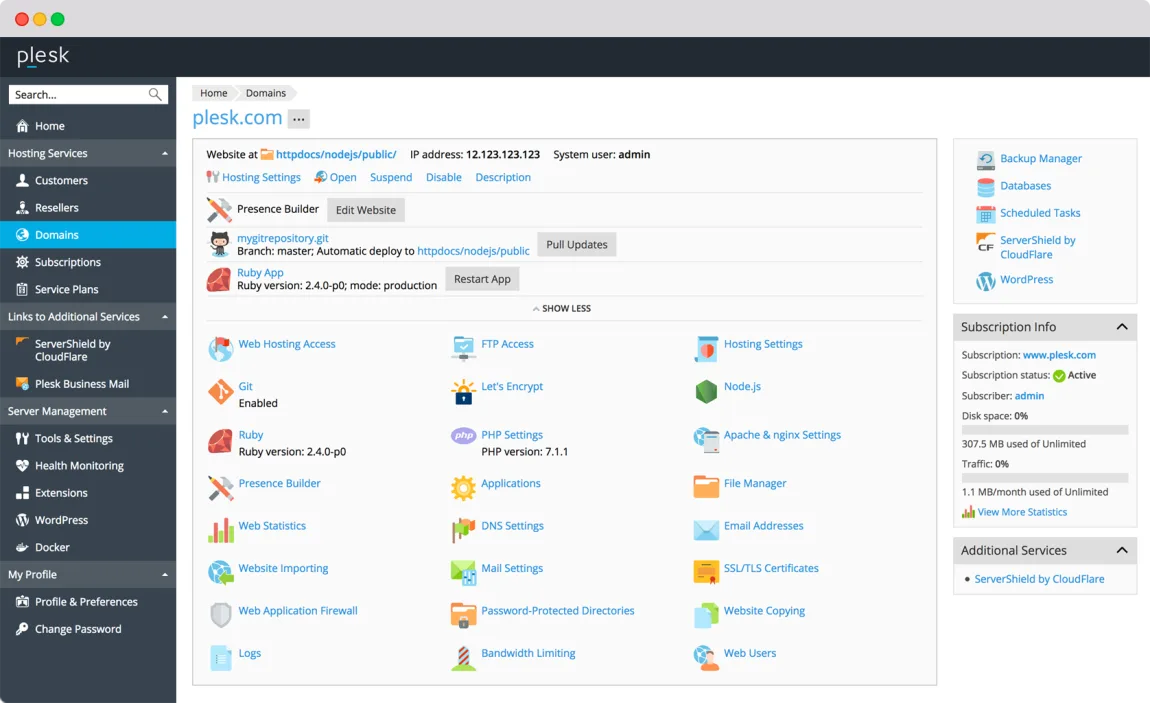
The marketing screenshots are old. The domain management image at the top of this article is served from a 2017 upload and shows PHP 7.1.1, a version that reached end of life in 2019. The WP Toolkit screenshot shows WordPress 5.8 and PHP 7.4.21. The panel has changed since. It is cosmetic, but it is the same inattention that left the XX placeholders in place.
There is a typo in the comparison table. The WordPress row is labelled “WP Tookit”. Trivial on its own, and consistent with everything else about how that page is maintained.
Payments from Russia are not accepted. A notice at the top of the pricing page states this plainly and says existing licences will lapse at the payment due date for affected customers.
What Plesk Gets Right
Per-server, not per-site, pricing. Consolidating many sites onto one box is rewarded rather than punished, which is the correct incentive for an agency.
WP Toolkit is genuinely good. Staging, cloning and update testing across every WordPress install on a server is the feature that justifies the licence for a large share of buyers.
The trial is honest. Two weeks, fully functional, no credit card required. For infrastructure software that is a real trial rather than a lead-capture form.
No contract. The FAQ states there is no agreement to sign and you can upgrade or downgrade editions at any time, which is the right flexibility for a business whose server count changes.
It runs where you already are. Plesk publishes images for AWS, Azure, Google Cloud, Alibaba Cloud, DigitalOcean, Linode, Vultr, UpCloud, IBM Cloud and OVH, so you are not tied to a particular host. If you are standing up cloud infrastructure more broadly, the same per-hour thinking I applied to cloud GPU pricing on Runpod applies here: the licence is a fixed cost on top of a variable one, so the server bill and the panel bill want budgeting separately.
Who Should Skip Plesk
- Anyone on managed or shared hosting. If you do not administer the server, a panel licence is not yours to buy, and your host has already chosen one.
- Developers happy in a terminal. A single site on a VPS does not need a 12€ a month panel. Docker, a reverse proxy and certbot cost nothing.
- Anyone under 30 domains who is not reselling. Web Host is a 72 percent premium for reseller management you will not use.
- Budget-first buyers. Free panels exist. They have fewer features and thinner support, but if the licence fee is the deciding factor, that is the honest comparison to make.
- Anyone who needs certainty on renewal pricing today. Until those XX placeholders are filled in, the renewal figure is not published.
Frequently Asked Questions
How much does Plesk cost?
The pricing page lists Web Admin at 12.04€/mo, Web Pro at 18.29€/mo and Web Host at 31.38€/mo in its main block, with a second block showing 6.60€, 9.90€ and 16.50€ for the same editions. Prices are in euros and exclude VAT. The regular renewal price is shown as “XX€” and is therefore not currently published.
What is the difference between the editions?
Domain caps of 10, 30 and unlimited, and a management feature split. Web Admin has no subscription, account or reseller management and only WP Toolkit SE. Web Pro adds all of that except reseller management. Web Host adds reseller management and removes the domain cap.
Should I buy a VPS or a dedicated licence?
Features are identical. A dedicated licence installs on both dedicated and virtual servers; a VPS licence only on virtual ones. If you may move to bare metal during the term, buy dedicated.
Is there a free trial?
Yes. Two weeks, fully functional, and the FAQ states no credit card is required.
Does Plesk include email hosting?
Basic mail is part of the panel, but Plesk Premium Email, email antivirus and Plesk Email Security are listed as paid add-ons on all three editions.
Is Plesk the same company as cPanel?
Not the same product, but the same owner. Both are part of WebPros, along with SolusVM, WHMCS and XOVI.
Does the licence renew automatically?
Yes. The FAQ says all licences bought in the online store have automatic renewal enabled by default, with the renewal order created and paid at the end of the billing period.
Final Thoughts
The software is the easy part of this verdict. Plesk is a mature, capable control panel with the best WordPress tooling in its category, sensible per-server licensing, a genuine two-week trial, no contract, and images ready for every cloud you are likely to use. For an agency running client sites on its own servers, Web Pro at 18.29€ a month is a defensible line item and WP Toolkit alone can justify it.
The hard part is that the page you are expected to buy from is not in good order. Unfilled price placeholders, two blocks quoting different figures for the same editions, an expired offer still advertised, a repricing notice written in the future tense about a date ten months gone, and a partner minimum stated as both $250 and $500. Individually each is a content bug. Together, on a product that auto-renews, they shift a burden onto the buyer.
So treat the listed figures as indicative, not final. Decide the edition from the feature table rather than the price ladder, because that is where the real boundary sits: Web Admin for yourself, Web Pro the moment a client needs a login, Web Host only if you are genuinely reselling. Take the dedicated licence if a migration is plausible. Then start the free two-week trial on Plesk, confirm the renewal price in writing before the card is charged, and put the renewal date in your calendar.




Write Your Review
No reviews yet. Be the first to share your experience!