

Most AI video tools give you a clip. MagicLight’s pitch is that it gives you a film: one project, up to 50 minutes, with the same characters in every scene and the script, voices, subtitles and timing handled in the same workspace.
That is a real gap in the market, and if the product delivers on it even partly, it is worth knowing about. But a credit-based tool lives or dies on a single question that the marketing copy never answers directly: how many minutes of finished video does your monthly allowance actually buy? Published reviews of this product give wildly different answers, from 500 credits for a two minute video to 1,200 credits for one minute, which is a twentyfold disagreement about the only number that matters.
The answer is on MagicLight’s own pricing page, and it turns out there are two answers, 28 times apart. That is where this guide starts.
Quick Picks
| If you want to make… | Use | Plan that fits | Rough credit cost |
|---|---|---|---|
| Bedtime and kids stories | Story to Video, Picture Book style | Standard | About 60 credits a minute |
| Faith and teaching videos | Religion template, Story to Video | Standard or Plus | About 60 credits a minute |
| Explainers and lessons | Explainer template, Script to Video | Plus | About 60 credits a minute |
| A daily faceless channel | Text to Video, Vlog template | Pro | About 60 credits a minute |
| Jingles and music videos | Music to Video, Jingles template | Standard | About 60 credits a minute |
| Long documentaries | Long Video Generator | Ultra | About 3,000 credits per 50 min |
| Animating a photo you already have | Image to Video | Plus at minimum | About 1,680 credits a minute |
| Dialogue with matching mouths | AI Lip Sync plus Voice Cloning | Any paid plan | Charged on top of the scene |
Two things in that table do most of the work. Every paid plan unlocks every feature, so the tier you pick is purely a volume decision. And one row costs 28 times more per minute than the others.
How I Checked This
I did not film a comparison or run a stopwatch, and I am not claiming to have produced a 50 minute video. What I did was read the company’s own published pages against each other and do the arithmetic they left out.

The plan figures come from the pricing page: credits included, minutes of video generation, seconds of image-to-video, and the per-credit rate MagicLight itself prints on each card. The feature matrix comes from the comparison table lower on that same page. The model lists, tool catalog and style presets come from the site navigation and the public sitemap. The sample images come from the company’s own content delivery network, and I looked at every one of them before writing about it.
Where two MagicLight pages contradict each other, I have shown both and said I cannot resolve it from outside the product. Where a figure only exists in third-party reviews, I have said so rather than adopting it. Nothing here is legal advice, and the section on character styles describes what the pages show rather than reaching a conclusion about anyone’s rights.
Sixty Credits a Minute, or One Thousand Six Hundred and Eighty
Take the Standard plan. It includes 8,000 credits a month. The card says those credits are good for “up to 130 min video generation.” It also says they are good for “up to 290s image-to-video generation.”
Those are the same 8,000 credits. One line says they buy two hours and ten minutes. The next line says they buy four minutes and fifty seconds.
Dividing credits by output gives the rate: roughly 60 credits per minute through the main story pipeline, and roughly 1,680 credits per minute through image-to-video. That ratio holds almost exactly across all five plans, at 27 to 28 times.
| Plan | Credits | Video generation | Image-to-video | Credits per minute, main pipeline | Credits per minute, image-to-video |
|---|---|---|---|---|---|
| Standard | 8,000 | 130 min | 290 s (4m 50s) | 62 | 1,655 |
| Plus | 27,000 | 450 min | 960 s (16m) | 60 | 1,688 |
| Pro | 47,000 | 780 min | 1,680 s (28m) | 60 | 1,679 |
| Ultra | 150,000 | 2,500 min | 5,360 s (89m) | 60 | 1,679 |
| Ultimate | 280,000 | 4,670 min | 10,000 s (167m) | 60 | 1,680 |

This explains the chaos in the published reviews. The writer who reported roughly 1,200 credits for a minute of video was almost certainly working through image-to-video or a premium model. The headline “130 minutes” on the Standard card is the cheapest possible path, which is what “up to” means and what nobody reads it as.
The practical consequence is simple. Build your video by describing scenes and letting the system generate them, and the allowance is generous. Start from photographs you already have and animate them, which is the workflow most people assume they want, and a Standard plan gives you less than five minutes a month.
What the Five Plans Actually Buy
Once you know the credit rate, the plan comparison becomes a single sum: dollars per finished minute.
| Plan | Billed annually | Billed monthly | Minutes included | Cost per minute, annual | Cost per minute, monthly | 50-min videos per month |
|---|---|---|---|---|---|---|
| Standard | $7.50/mo ($90/yr) | $15.00 | 130 | $0.058 | $0.115 | 2.6 |
| Plus | $14.00/mo ($168/yr) | $28.00 | 450 | $0.031 | $0.062 | 9.0 |
| Pro | $22.00/mo ($264/yr) | $44.00 | 780 | $0.028 | $0.056 | 15.6 |
| Ultra | $45.00/mo ($540/yr) | $90.00 | 2,500 | $0.018 | $0.036 | 50.0 |
| Ultimate | $75.00/mo ($900/yr) | $150.00 | 4,670 | $0.016 | $0.032 | 93.4 |
The entry plan costs 3.6 times more per finished minute than the top plan. That is normal for volume pricing, but it is worth seeing plainly, because the Standard plan is the one most people will click and it is the worst value on the board by a wide margin.
It is also the plan where the headline promise runs out fastest. Every tier, including Standard, is marked “Supports 50 min video generation.” On Standard, 130 minutes of monthly allowance means two and a half full-length videos, and only if you never regenerate a scene you dislike.
The advertised price is the annual prepay price
Every figure in the big type on the pricing page assumes you pay for a year up front during a promotion the page labels “Limited Time: 50% OFF.” Standard is $7.50 a month if you hand over $90 today, and $15.00 a month if you pay as you go. The struck-through number beside each price is the real month-to-month rate.
The structured data the page publishes for search engines lists the offers as $7.50, $14.00, $22.00, $45.00 and $75.00, with no billing period attached to any of them. If a search result ever shows you “$7.50” for this product, that is where it came from, and it is the annual rate.
The per-credit figures printed on the cards, from $0.094 down to $0.027 per 100 credits, are calculated on those annual prices too. Pay monthly and every one of them doubles.
What you do not get by paying more
This is the part that genuinely favors the buyer, and it deserves saying clearly. The comparison table marks all five tiers with a check for access to all models, 50 minute video support, free character and image generation, 1080p export with no watermark, and a general commercial license.
Only three things change as you climb: the credit allowance, concurrency (60 simultaneous animations on the first three tiers, 80 on Ultra, 120 on Ultimate, with three parallel videos until Ultimate’s four), and two perks reserved for Ultra and Ultimate, described as “limited beta test access” and “top VIP accelerate video generation.”
So there is no feature paywall here, which is unusual in this category and a point in the product’s favor. Buy on volume alone.
One wrinkle I cannot resolve from outside. The Standard and Plus cards say “Full access to foundational models.” The Pro, Ultra and Ultimate cards say “20% off foundational models.” Read literally, the two cheapest plans include something that the three expensive plans merely discount, while the comparison table further down the same page gives all five a check for “access to all models.” Those three statements cannot all mean the same thing, and the page does not define “foundational models” anywhere.
The Eight Things Worth Spending Credits On
MagicLight’s catalog is enormous, with hundreds of individual tool pages, but most of them are entry points into the same handful of engines. These are the jobs the platform is actually built for, with the plan that fits each one.
1. Kids and bedtime stories
Use Story to Video with the Picture Book or 3D Cute styles. This is plainly the product’s oldest and best-developed use case: every customer testimonial on the homepage is about children’s stories, the template library leads with them, and the character-consistency engine matters more here than anywhere else, because a four-year-old notices when the rabbit changes color.
A ten minute story costs around 600 credits, so the Standard plan covers roughly a dozen a month. Start here if you are trying the product at all.
Watch for: consistency is the selling point and the weak spot at the same time. More on that below.

2. Faith and teaching videos
There is a dedicated Religion template category and a worked example at the company’s own story pages. This is a genuinely under-served niche on other AI video platforms, and the long-form capability suits it: a 20 minute teaching video is a normal length here and an impossible one on tools that cap out at 10 second clips.
Budget around 1,200 credits for 20 minutes, which Standard covers comfortably. If you publish weekly, Plus is the better per-minute deal.
3. Explainers and lessons
The Explainer template plus Script to Video is the right pairing if you already have the words written. Educators are one of the five audiences MagicLight names on its tools page, and the workflow fits: paste a lesson script, get a storyboard, adjust the frames you dislike.
At 60 credits a minute, a 15 minute lesson is about 900 credits. Plus gives you 450 minutes a month, which is thirty lessons.
Watch for: the sample image MagicLight uses for its Explainer category on the homepage is a photoreal sports car drifting through neon rain, which tells you something about how loosely these category labels map to their artwork.
4. Faceless daily channels
Text to Video with the Vlog template, or the Reddit-story and short-drama entry points. This is the volume use case, and volume is exactly what the pricing rewards. Pro at $22 a month annually gives you 780 minutes, which is 26 minutes of finished video every day for the price of two coffees.
If you are publishing daily, this is the tier where the economics stop being a question. The jump from Plus to Pro adds 330 minutes for $8 a month.

5. Jingles and music videos
Music to Video plus the Jingles template. Feed a track, get visuals cut to it. MagicLight also lists a separate lyric video generator and karaoke maker, which are the same engine with different front doors.
Short by nature, so the Standard allowance goes a long way. This is probably the single cheapest thing on the platform to experiment with.

6. Long documentaries and full-length stories
The Long Video Generator is the only tool here that does something its competitors genuinely cannot, and it is why the product exists. Fifty minutes in a single project, with scene linking and character continuity carried across the whole run.
At roughly 60 credits a minute, a full 50 minute piece is about 3,000 credits. That is comfortable on Ultra, which includes 150,000 credits and would allow 50 such videos a month, and uncomfortable on Standard, which allows two and a half.
The company’s own FAQ says a 5 minute video typically renders in 3 to 6 minutes and a 30 minute video in 10 to 15, which is a reasonable and refreshingly specific thing to publish.
Watch for: drift over length is the recurring complaint in independent reviews, and the company’s own demonstration image does not entirely dispel it.
7. Image to video, with the meter running
This is the one to approach deliberately. Animating a still you already own is the most intuitive thing a video AI can do, and on MagicLight it is also the most expensive by a factor of 28.
Four minutes and fifty seconds a month on Standard. Sixteen minutes on Plus. If this is your main workflow rather than an occasional flourish, you need Pro at minimum, and you should do the sum before subscribing rather than after.
8. Voices, lip sync and subtitles
Voice cloning and custom character design are available on all paid plans according to the pricing FAQ, and the lip sync tool matches mouth movement to the audio. The subtitle generator and video translator sit at the end of the same pipeline for distribution.
These are charged on top of scene generation rather than instead of it, and the pricing page does not publish a separate rate for them, which means the only honest thing to say is that your real per-minute cost will run above the 60 credit baseline once voices and sync are in the mix.
What the Marketing Pages Do Not Tell You
The style presets are named after other people’s films
MagicLight’s “Create by Style” menu includes presets at /create/style/disney/, /create/style/pixar/ and /create/style/zootopia/. The tools catalog adds dedicated pages for a Ghibli AI video generator, a Pixar AI video generator, a Barbie AI generator, a Marvel intro maker, two Minecraft generators, a Roblox animation maker and a random Disney song generator, plus original-character makers named for roughly a dozen more franchises including One Piece, Demon Slayer, Pokemon, The Simpsons, South Park, Undertale and Transformers.
It goes further than style names. Several of the images the company uses to sell the product depict characters that are recognisably from specific films. The sample labelled as its 3D animation style shows two sisters in front of an ice palace, one with a platinum braid and ice-blue gown. The sample labelled as its animated cartoon style shows a child with a yellow umbrella standing in the rain beside a large grey forest spirit with a pale chevron-marked belly. The illustration heading the long-form video feature shows a small dark-haired girl with a blue furry monster. The image-to-video sample is a 1930s rubber-hose cartoon cat in white four-fingered gloves. The sample labelled as the anime style is a blonde woman with pink and blue dyed pigtails and a black choker, drawn in American comic style.
Set that beside what the pricing page promises on every single tier: a “general commercial license,” and in the copy below, “Publish and profit across platforms without restrictions.” The tools FAQ puts it even more plainly: “All paid plans include full commercial rights to the videos you create. You own the content and can monetize it.”
Those two things do not sit together. A licence from MagicLight can only cover whatever rights MagicLight holds. It cannot convey rights in characters owned by Disney, Mattel, Studio Ghibli, Nintendo or anyone else, and no clause in a subscription agreement changes who owns Elsa. I am not making a claim about whether generating in a given style infringes anything, which is a genuinely unsettled question. I am pointing out that the risk of a takedown, a demonetisation or a rights claim lands on the person who publishes the video, and the marketing copy invites you not to think about it.
The same catalog also contains generators named for specific living people, including a Trump AI video generator, an Elon Musk AI video generator and a general celebrity video generator, alongside pages for “uncensored,” “unfiltered” and “no restrictions” generation and a fake news video generator. If you intend to build a business on this platform, read the terms of service yourself and decide what you are comfortable publishing under your own name.
The consistency demonstration is not consistent
Character continuity is the product’s central technical claim. The image MagicLight uses to demonstrate it is a four-panel grid showing the same scene: a blue-haired girl at a kitchen table with a pink dragon sitting in a leather bag, eating biscuits.
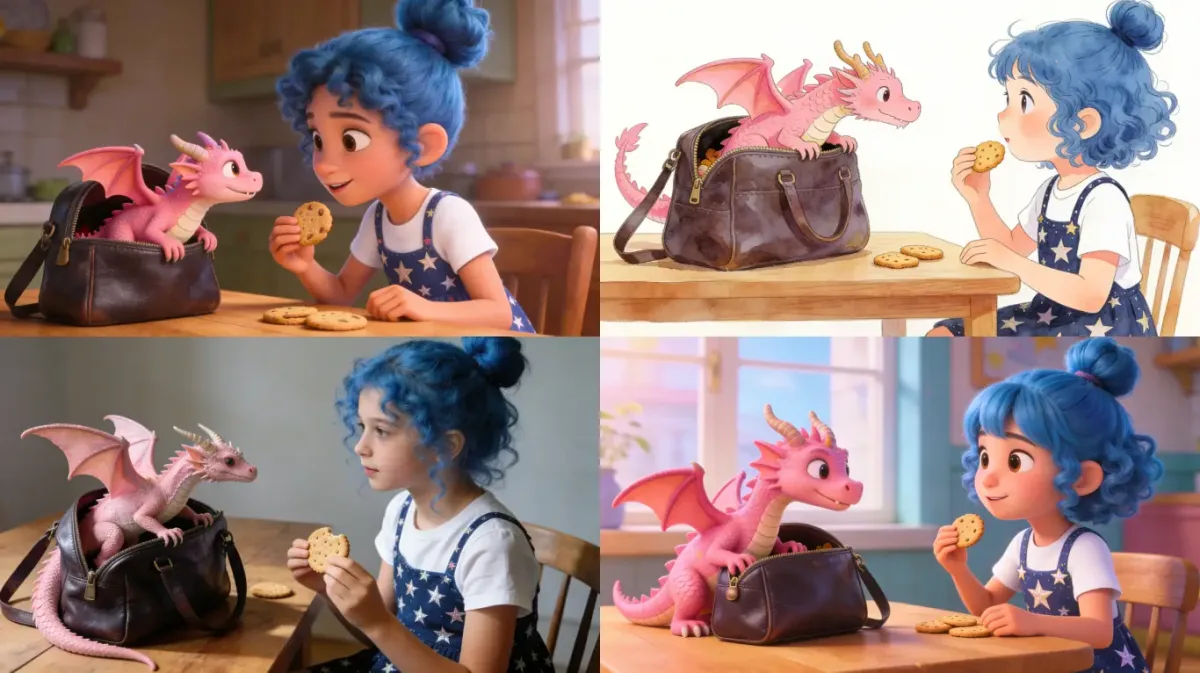
Across those four panels the girl’s hair changes from a tied-up bun to loose curls and back, the pattern on her apron shifts, and the dragon changes noticeably in colour and in the size and shade of its wings. The scene is clearly the same scene. The character is not clearly the same character.
That matches what independent reviewers report about long exports, where character drift and altered details are the most common complaint. It does not mean the feature fails, and holding a character roughly stable across a 50 minute video is a hard problem that most competitors do not attempt at all. It does mean you should expect to regenerate scenes, and regenerating costs credits every time.
Two star ratings on the same website
The pricing page displays a 4.7 rating “from 2,000+ reviews on All Platforms.” The tools page displays a 4.0 rating “from 1,750+ reviews on all platforms.” Same site, same day, two different averages from two different review counts, and neither names a single platform the reviews are on or links to one.
Three pages, three different lists of AI models
Credits are consumed “based on video length, quality, and AI models used,” by the company’s own FAQ. So which models you get is a pricing question, not a trivia question. The site gives three different answers.
The homepage navigation lists Seedance 2.5, Kling 3.0, VEO 3, Sora 2, Wan 3.0, MiniMax H3 and six others. The tools page navigation lists a largely different set headed by Gemini-3, Nano Banana 2, Sora 2 and Veo-3, running to more than seventy entries. The pricing cards name a third set: “Seedance 2.5, Seedance 2.0” and “Nano banana 2, GPT 5.5, Minimax-H3.” Version numbers for the same families differ between pages.
There is also a small quality tell in the catalog itself: two separate live pages for the same model, both spelling the brand “chatgtp” rather than ChatGPT, reachable at nearly identical addresses.
The usage numbers, divided into each other
The homepage reports 50 million minutes of video created, 30 million videos generated, and 20 million creators worldwide. None of the three carries a source or a date.
Divide the first by the second and the average MagicLight video runs 1 minute 40 seconds, on a platform whose entire proposition is video up to 50 minutes long. Divide the second by the third and the average creator has made 1.5 videos. And 2,000 reviews across 20 million creators is a review rate of one in ten thousand.
Any one of those could have an innocent explanation. Together they suggest the three numbers were not written to be read against each other.
Two testimonials, four names
Seven named customers appear on the homepage with photographs and job titles. Between them they supply five distinct quotes.
The words “I was amazed by how quickly my daughter connected with the stories. She repeats the characters’ names all day” appear twice, credited once to Sarah Chen, Content Creator, and once to David Kim, Parent & Designer. The words “We’ve tried many storytelling apps, but this is the first one my kids genuinely love” appear twice, credited once to Michael Rodriguez, Marketing Director, and once to Amanda Foster, Stay-at-home Mom.
It is also worth noting that all seven testimonials are about children’s bedtime stories, on a page headlined as a long-form video generator for marketers, educators and comedy channels. The Federal Trade Commission’s endorsement guides expect testimonials to reflect the honest experience of actual users. Two sentences attributed to four different people with four different job titles do not obviously meet that standard.

Smaller things
The site’s own comparison table pits “Magiclight” against “Other AI Video Tools,” an unnamed competitor whose entries are “Varies,” “Rare” and “Paywalled.” The style menu lists “Kids Story Page” three separate times among its visual styles and offers one called “Ghost Hrror.” The sitemap lists an /alternatives/ page in sixteen languages, and the English one returns a 404. And the style labels do not match their artwork: the watercolor sample is a glossy 3D render, while the animated cartoon sample is a watercolor.
Who Should Skip MagicLight
Anyone who needs output above 1080p. The export ceiling is 1080p on every plan including the $150 a month one, with no 2K or 4K option published anywhere. For YouTube that is fine. For client delivery or anything destined for a large screen, it is a hard stop.
Anyone doing brand or product work where details must be exact. Independent reviewers consistently report logos and packaging being altered in long exports, and the company’s own consistency demonstration shows a character shifting between panels. A system that reinterprets your product every few scenes is the wrong tool for a product video.
Anyone whose workflow starts from existing photographs. At 28 times the credit cost, image-to-video is priced as a garnish, not a main course, and a Standard plan buys under five minutes of it a month.
Anyone who cannot accept the licensing ambiguity. If your channel is monetised and your content is your income, building it on style presets named after other studios’ films is a risk you are carrying personally, whatever the commercial-rights copy says.
And anyone who wants certainty about what they are buying. Between two star ratings, three model lists, two contradictory statements about foundational model access and usage numbers that do not reconcile, this is a company whose published facts about itself need checking before you rely on any of them.
Frequently Asked Questions
How many credits does a minute of video actually cost?
Around 60 credits a minute through the main story pipeline, which is what the pricing page’s own figures work out to on all five plans. Image-to-video is the exception at roughly 1,680 credits a minute, about 28 times more. Voices, lip sync and premium models are charged on top, so treat 60 as a floor rather than an estimate.
Is the $7.50 a month price real?
Yes, if you pay $90 for a year up front during the promotion the page labels “Limited Time: 50% OFF.” Month to month, the Standard plan is $15. The same doubling applies to every tier and to the per-credit rates printed on the cards.
Which plan should I start on?
Standard if you are still exploring, Plus or Pro if you are publishing regularly. Standard is the worst value per minute on the board, at 3.6 times the cost of Ultimate, but it unlocks every feature including 50 minute videos, 1080p export without a watermark and the commercial licence. There is no feature reason to go higher until you run out of credits.
Is there a free plan?
Yes. MagicLight’s FAQ says you can create for free with limited credits and no card required, with video duration restricted on the free tier. It does not publish how many credits that is. Use it before paying, and specifically use it to see whether character consistency holds up on the kind of story you want to tell.
Can I really use the videos commercially?
MagicLight grants a general commercial licence on all paid plans, and that part is clear. What it cannot grant is rights in anything it does not own. If you generate in a style preset named after a film studio’s work, or use one of the franchise or celebrity tool pages, the commercial licence from MagicLight does not resolve the third party’s rights, and the exposure is yours. This is not legal advice, and if money depends on the answer, get some.
How long does a long video take to render?
The company’s tools FAQ says a 5 minute video typically takes 3 to 6 minutes and a 30 minute video 10 to 15 minutes, varying with complexity. That is one of the more specific and useful numbers it publishes.
What happens to my credits if I cancel?
The pricing FAQ says credits remain available until the end of the billing period. On an annual prepay that is the rest of the year you have already paid for.
Final Thoughts
The core product here is doing something unusual, and that deserves acknowledging before anything else. Almost every AI video tool on the market generates clips and leaves you to assemble them. MagicLight is trying to generate a whole piece, with the same characters at minute forty as at minute one, and it puts scripting, voices, subtitles and timing in the same place. At roughly three cents per finished minute on a mid tier, nothing about the price is unreasonable for what is being attempted. Putting every feature on the cheapest paid plan is a genuinely creator-friendly decision that most of this category gets wrong.
The problem is that almost everything surrounding that product needs verifying. The headline throughput figure is true only on the cheapest path and off by a factor of 28 on the most intuitive one. The advertised price is the annual rate. The star rating depends which page you land on. The model list depends which page you land on. The demonstration of character consistency shows a character changing. Two testimonials are signed by four people. And the gallery selling you an unrestricted commercial licence is substantially populated by characters from films the company does not own.
None of that makes it a bad tool. It makes it a tool whose own marketing is the least reliable source of information about it, which is an odd place for a buyer to be.

So: try the free tier first and push it at the specific thing you need, which for most people is whether your main character survives ten minutes intact. If it does, Plus or Pro is where the per-minute economics make sense. Keep image-to-video for moments rather than methods. And build your channel on your own characters, not on a style preset named after someone else’s.
You can check the current plans and start on the free tier at MagicLight, where every figure in this article came from. If you are weighing AI tools by what they really cost to run rather than what the landing page says, our breakdown of what AI app builders charge per project applies the same arithmetic to a different category, and the rest of our software and tools coverage sits alongside it.


Write Your Review
No reviews yet. Be the first to share your experience!