

An AI calendar tool has one job: give you back hours you were going to lose. Which makes it the one software category where the price and the payback are measured in the same unit, and where a vendor’s own arithmetic is worth checking before you hand over a card.
So that is what this guide does with Reclaim.ai. It works out what each plan costs per seat on both billing cycles, flags the second meter most buyers never notice, picks the features actually worth configuring, and looks closely at the part our readers keep asking about: an MCP server that lets you move your real calendar from a conversation with Claude.
Published reviews of this product disagree on something as basic as the Enterprise price, quoting $30, $18 and $22. One of those is right. The rest of this article explains how to tell.
Quick Picks
| If you are… | Plan | Per seat, yearly | Why |
|---|---|---|---|
| One person protecting focus time | Lite | Free | Five agents and real scheduling, no card |
| Hitting the one week planning wall | Starter | $10/mo | Extends the horizon from 7 days to 8 weeks |
| Running a team of 10 to 100 | Business | $15/mo | 100 agents a seat, 12 week horizon, analytics |
| Over 100 seats | Enterprise | $22/mo | Unlimited agents, but annual billing only |
| Driving your calendar from Claude | Starter and up | $10/mo | MCP is not on the free plan |
| Booking meetings for other people | Starter | $10/mo | Unlimited scheduling links instead of one |
| Running big recurring meetings | Business | $15/mo | Cheaper Attendee Users, which you will need |
| On Apple Calendar, or mobile only | None | Not offered | Google and Outlook only, no mobile app |
How I Checked This
No trial account, no screenshots of my own calendar, and no claim that I have run this product for a quarter. What I did was read Reclaim’s published pages against each other and do the arithmetic they left out.
Plan prices, seat caps, agent counts and scheduling ranges come from the pricing page, read in both the yearly and monthly states, because several numbers change between them and the page only ever shows you one. The feature set comes from the thirteen individual feature pages. The MCP details come from the Claude integration page. The affiliate terms, which I am required to understand before writing this, come from the affiliate program page.
Where Reclaim’s own pages contradict each other, I have shown both numbers and said I cannot resolve which is current from outside the product. Where third-party reviews quote figures that do not appear anywhere on Reclaim’s site today, I have gone with the live page.
The Discount Maths Does Not Work
Start with the plans. Reclaim sells four tiers, and the per-seat price changes with the billing cycle on two of them.
| Plan | Yearly, per seat/mo | Monthly, per seat/mo | AI agents per seat | Seats | Scheduling range |
|---|---|---|---|---|---|
| Lite | Free | Free | 5 | 1 | 1 week |
| Starter | $10 | $12 | 10 | Up to 10 | 8 weeks |
| Business | $15 | $18 | 100 | Up to 100 | 12 weeks |
| Enterprise | $22 | Not available | Unlimited | Over 100 | 12 weeks |
Now do the division. Starter is $10 a seat on yearly against $12 on monthly. That is a saving of 16.7 percent. Business is $15 against $18, which is also 16.7 percent.
Here is what the same page tells you that saving is:
- The billing toggle, at the top of the plan table, reads “Yearly – SAVE 20%”.
- The FAQ, further down the same page, reads “We offer a 29% discount for annual billing vs. monthly.”
- The banner above everything reads “Save 30% today-only on Starter & Business plans”.
- A fourth block offers 20% off with code MEETINGS.
Three different answers to one arithmetic question, and the real answer is none of them. For the 29 percent claim to hold, Starter would have to be $8.52 a seat yearly rather than $10, and Business $12.78 rather than $15. For the toggle’s 20 percent, $9.60 and $14.40.
Annual billing on Reclaim is a reasonable deal. It saves you $24 a seat a year on Starter and $36 on Business. It is simply not the deal any of the three numbers on the page describe, and the gap between 16.7 and 29 is not a rounding difference.
One more thing about that banner. It says “today-only”. It was also sitting at the top of every other page I fetched that day, including the feature pages, the Claude integration page and the affiliate recruitment page. A one day offer that appears site wide is a layout element, not a deadline, and it is the one piece of this pricing page I would most like to see go.
Attendee Users: The Meter Nobody Mentions
This is the part that will surprise a team lead at renewal, and it is the single most useful thing in this guide.
Reclaim does not only bill you per seat. It also bills for Attendee Users, defined on the pricing page as attendees without a paid Reclaim seat who are in Smart Meetings with three or more people. Two-person meetings do not count. AUs are cumulative across the whole team account.
In other words: the moment you use the flagship Smart Meetings feature on a recurring meeting that includes people outside your paid seats, you start consuming a second resource with its own price list.
| Plan | AU pack | Cost, yearly billing | Per AU | Cost, monthly billing | Per AU |
|---|---|---|---|---|---|
| Starter | 3 AUs | $8/mo | $2.67 | $10/mo | $3.33 |
| Starter | 12 AUs | $32/mo | $2.67 | $40/mo | $3.33 |
| Business | 6 AUs | $12/mo | $2.00 | $15/mo | $2.50 |
| Business | 24 AUs | $48/mo | $2.00 | $60/mo | $2.50 |
| Enterprise | 10 AUs | $18/mo | $1.80 | Not available | |
| Enterprise | 40 AUs | $72/mo | $1.80 | Not available |
Work an example. A five person team on Starter pays $50 a month for seats. If their recurring project meeting includes nine people from other departments, that is nine AUs, which on Starter means buying the 9-pack at $24 a month. The bill is now $74, and nearly a third of it is for people who do not have an account.
Two things soften this. Each AU pack you buy includes a free seat you can hand to someone on your team, which is a genuinely fair piece of design. And the per-AU rate falls as you move up: $2.67 on Starter, $2.00 on Business, $1.80 on Enterprise. If your meetings are large, Business pays for itself on AUs alone before you count any feature.
What does not soften it is the note sitting above the AU price list: “LAUNCH PROMO: Attendee Users (AUs) are 100% free through July 31st.” July 31 was nearly three months before this article was written. Either the promotion ended and the banner was never removed, or it has been silently extended. The page does not say which, and that is a sentence doing real work in a buying decision.
The Eight Features Worth Setting Up
Reclaim ships thirteen named features. Most people will use four. These are the ones that change how a week runs, in the order I would configure them.
1. Focus Time
Set a weekly target for deep work and Reclaim defends blocks around whatever is already on the calendar, moving them as meetings land. This is the feature the whole product is built around, and it is on the free plan.
The limit to understand on Lite is not the feature, it is the horizon. The free plan optimizes one week ahead. That is enough to protect tomorrow, not enough to protect a project.
2. Habits
Recurring personal routines that find their own best slot inside windows you define, rather than sitting at a fixed time and getting steamrollered. Gym, language practice, the Friday review, the weekly one-to-one prep.
Habits are where the product earns loyalty, because they survive a chaotic week instead of being the first thing that falls off it. Also free on Lite.
3. Scheduling Links
The Calendly replacement, with priority rules attached so the right meetings get the better slots. Reclaim’s own claim is that its links share 524 percent more availability than a conventional booking link, which is a very specific number with no methodology attached to it anywhere I could find.
The real reason to upgrade here is quantity. Lite gives you one scheduling link. Starter gives you unlimited. If you book with people outside your company at all, that single link is the constraint that pushes you to pay.
4. Calendar Sync
Copies events between calendars so your work calendar knows your personal one is busy, without exposing what the event is. Anyone running two or three calendars will want this on day one.
Same pattern as scheduling links: Lite gives you one sync, paid plans give you unlimited. Two calendars is one sync, so Lite just covers the common case.
5. Buffer Time
Automatic breaks and travel time around video calls so back-to-back days have gaps in them. Cheap to set up, immediately visible, and the feature most likely to make a colleague ask what you are using.
6. Smart Meetings
Converts a recurring meeting into one that reschedules itself around attendee conflicts. Powerful, and the one feature with a billing consequence: meetings with three or more people pull in Attendee Users for anyone without a paid seat.
Set this up last, and set it up deliberately. Turn it on for the two or three recurring meetings that genuinely keep slipping, not for the whole calendar, and watch the AU count before you roll it out to a team.
7. Time Tracking and analytics
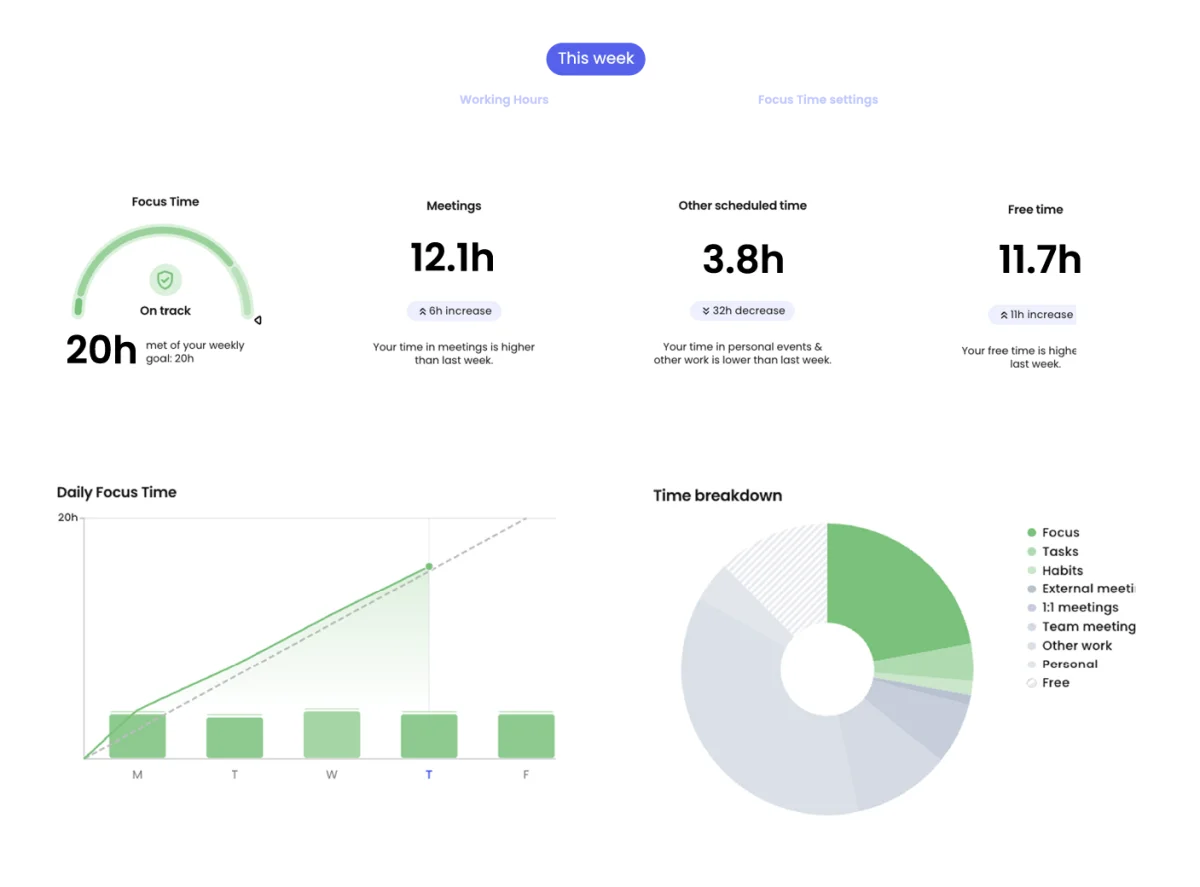
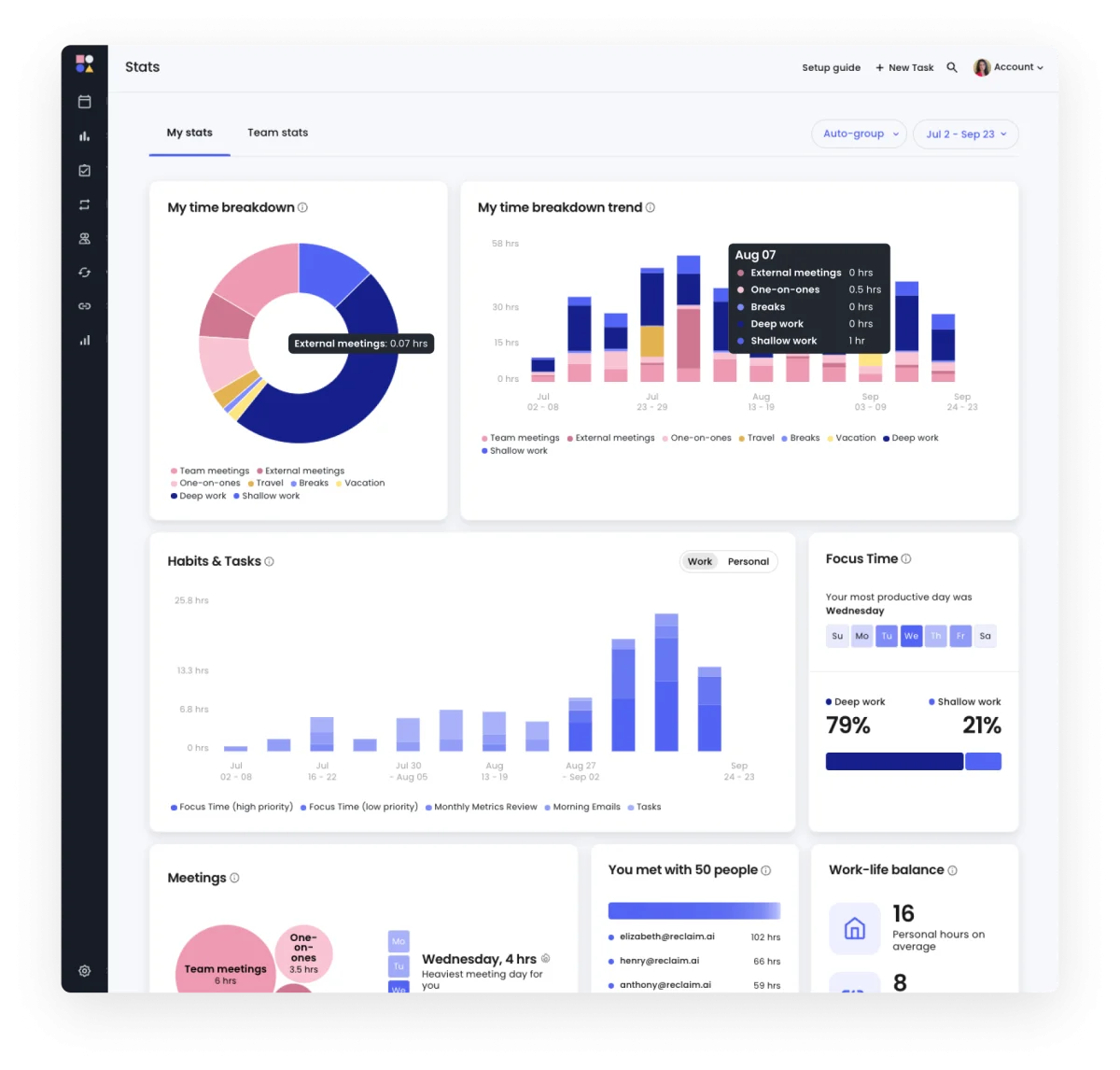
Reclaim measures where the week actually went: focus hours against goal, meeting load, personal time, and a breakdown by category. On Business it extends to team level, with work-life balance metrics and capacity planning.
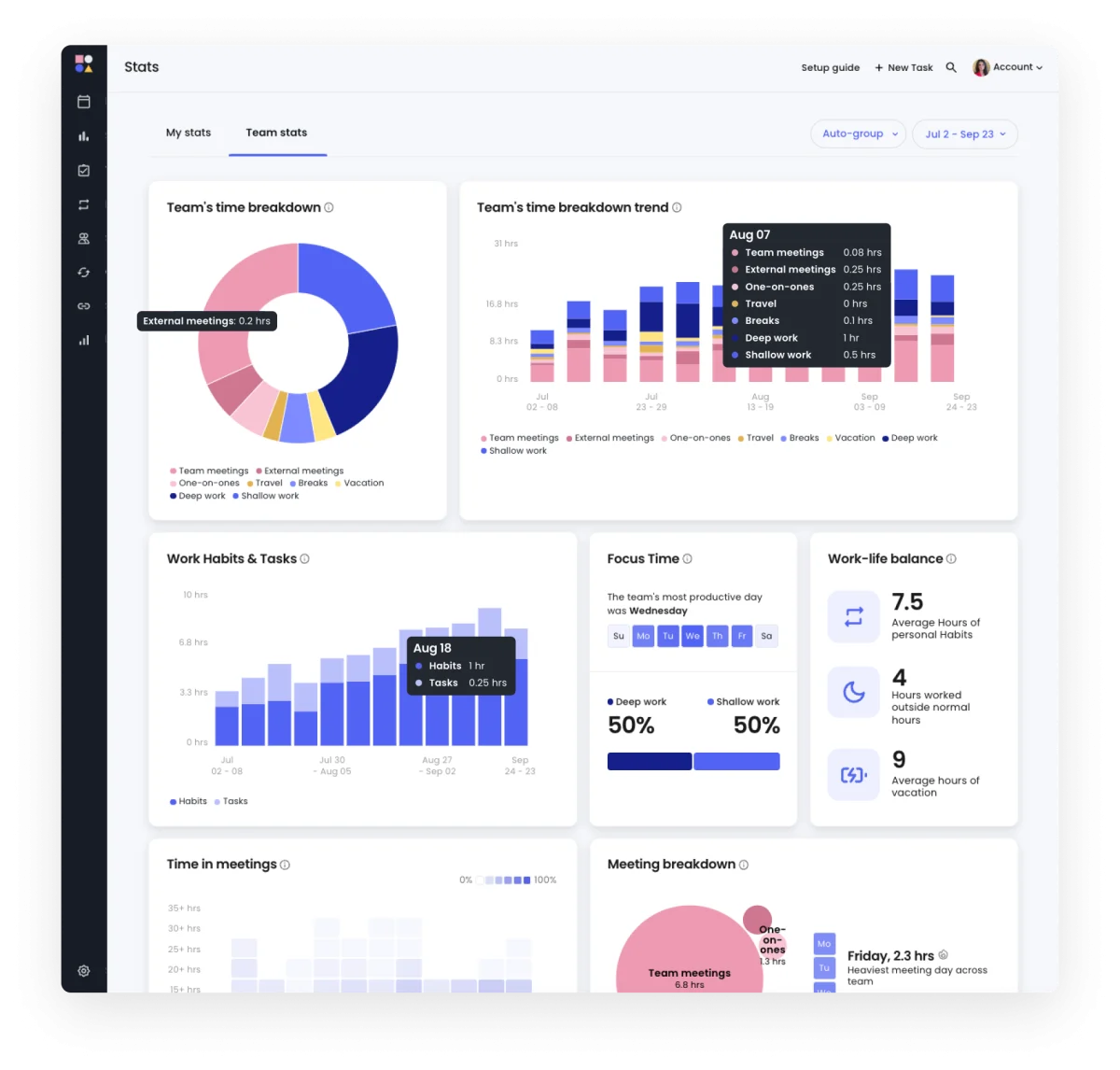
This is the part that justifies the spend to a manager, because it produces a number rather than a feeling. It is also the part to think about before deploying across a team, since time analytics on other people’s calendars is a different conversation from scheduling your own.
8. The AI Assistant and Planner
Chat-driven planning inside the product, plus an automated daily plan across your smart events. Useful, and largely superseded for our readers by the thing in the next section.
Driving Your Calendar From Claude
This is the feature that makes Reclaim worth a separate look rather than another row in a comparison table, and almost no review of it mentions this exists.
Reclaim publishes an MCP server at mcp.reclaim.ai. You add it in Claude under Settings, Connectors, as a custom connector, complete the Reclaim OAuth flow, and your calendar becomes something you can talk to. It works in Claude Desktop, Claude on the web, and Claude Code in the terminal, all over the same connection.
What you can ask for, per Reclaim’s documentation: view, analyze or summarize your schedule, protect focus blocks, defragment a week in one prompt, and create, move, reschedule or cancel events.
The safety design is the part worth praising, and it is unusually careful:
- Per-tool permissions. Each Reclaim tool can be set to Auto-approve, Needs approval, or Block, from Claude’s own connector settings. You decide which operations an assistant may perform unattended.
- Preview Mode on every write. Questions about your schedule answer instantly, because reading is harmless. Anything that changes the calendar lands in Preview Mode first and waits for you.
- Read and write are separated by default, which is the correct way round and not how every vendor ships this.
We looked at another tool with a well designed MCP server recently, where the protection was a server-enforced ceiling on what a single call could spend. Reclaim’s problem is different, because the risk is not money, it is an assistant quietly rearranging a week you had agreed with other people. Preview Mode is the right answer to that, and putting the permission switches in Claude rather than burying them in Reclaim’s settings is the right place for them.
Two caveats. MCP requires a paid plan: the integration page lists Starter, Business and Enterprise, so the free Lite tier is out. And it is labelled “New in 2.0”, so expect the surface to keep moving.
What the Marketing Pages Do Not Tell You

The headline productivity figure has three values
Reclaim promotes a specific claim about how many hours it gives back. Which number you see depends on where you land:
- The homepage says 7.6 hours more focus time a week.
- The affiliate recruitment page says 7.6 hours more productive a week, alongside a 41 percent productivity increase.
- The ROI calculator on the pricing page says 5.7 hours more productive a week.
- A second block on that same pricing page says 12.7 hours.
Two of those sit on one page, a little over a screen apart. The figures that stay constant across the whole site are 2.3 fewer meetings a week and 49 percent less time wasted, neither of which carries a link to a methodology.
And the customer count has two
The homepage says more than 600,000 users across 70,000 companies. The affiliate page says more than 600,000 people across 65,000 companies. Same user figure, two company figures, 5,000 apart.
None of this makes the product worse. It does mean that if a number on this site matters to your decision, check whether the other pages agree with it.
No Apple Calendar, and no mobile app
Reclaim’s published integration list has fourteen entries: Asana, ChatGPT, Claude, ClickUp, Google Calendar, Google Tasks, Jira, Linear, Outlook Calendar, Raycast, Slack, Todoist, webhooks and Zoom. Apple Calendar is not among them, and the words Apple, iCloud, iOS and Android do not appear anywhere on the homepage or the pricing page.
If your calendar lives in iCloud, this product has nothing to connect to. If you expect to approve a reschedule from your phone, there is no app to do it in. Independent reviews have been making both points for a while, and the vendor’s own silence is the clearest confirmation available.
The copyright line disagrees with itself
One footer block on the pricing page reads “© 2025 Reclaim.ai”. Another, lower on the same page, reads “© 2026 Reclaim.ai, Inc.” A trivial detail on its own, and a reasonable proxy for how carefully the rest of the page is maintained.
The discounts you are actually eligible for
Buried below the plan table is the most useful block on the page, and the one no banner points at:
- Students, educators and faculty: 50 percent off for 12 months.
- Nonprofits: 20 percent off for three years.
- Startups: 20 percent off for three years.
- Switching from Clockwise, Motion or Calendly: 20 percent off for six months.
Three years at 20 percent is worth considerably more than the “today-only” 30 percent in the banner, and all four require an application rather than a code. If you qualify for any of them, apply before you subscribe, not after.
Who Should Skip Reclaim.ai
Anyone on Apple Calendar. There is no integration and no stated plan for one.
Anyone who needs to manage their schedule from a phone. There is no mobile app, which for a product whose whole value is reacting to a changing day is a real gap, not a nitpick.
Anyone who wants a task and project manager as well. Reclaim schedules tasks it is given and integrates with Asana, Jira, Linear, ClickUp and Todoist, but it is not trying to replace them. Tools like Motion aim at that job and charge accordingly.
Anyone whose calendar is mostly other people’s meetings. If you have no discretionary time, an optimizer has nothing to optimize. Fix the meeting load first, which Reclaim’s own analytics will at least help you prove.
And any team planning to deploy Smart Meetings broadly without first counting attendees outside their seat list. That is where a tidy per-seat budget becomes an untidy one.
Frequently Asked Questions
How much does Reclaim.ai actually cost?
Lite is free. Starter is $10 per seat a month billed yearly, or $12 billed monthly. Business is $15 yearly or $18 monthly. Enterprise is $22 per seat a month and is annual only, with no monthly option. Attendee Users are charged on top of all of it.
Is the annual discount really 30 percent?
No. Comparing Reclaim’s own yearly and monthly prices gives 16.7 percent on both Starter and Business. The page advertises 20 percent on the billing toggle, 29 percent in the FAQ and 30 percent in the banner. Annual billing is still worth taking, at $24 a seat a year saved on Starter and $36 on Business, just not for the reason advertised.
What are Attendee Users and will I be charged for them?
An Attendee User is someone without a paid Reclaim seat who is in a Smart Meeting of three or more people. They are cumulative across the team account. On Starter they cost about $2.67 each a month, on Business $2.00, on Enterprise $1.80. A pricing page note says AUs were free through July 31, which has passed without the note being updated, so confirm the current position with Reclaim before planning around it.
Is the free plan actually usable?
For one person, yes. You get five AI agents, Focus Time, Habits, Buffer Time, Smart Meetings and task recommendations. The real ceiling is that it only optimizes one week ahead, and you get one calendar sync and one scheduling link. Most people hit the scheduling link limit first.
Can I use Reclaim from Claude or ChatGPT?
Yes. Reclaim runs an MCP server at mcp.reclaim.ai that you add in Claude as a custom connector, and it works in Claude Desktop, Claude web and Claude Code. Every tool can be set to auto-approve, require approval or be blocked, and calendar changes go through Preview Mode before they commit. It needs a paid plan; the free Lite tier is excluded. There is a separate ChatGPT integration listed.
Does it work with Apple Calendar or on a phone?
No on both counts. The published integrations cover Google Calendar and Outlook Calendar only, and Reclaim’s site makes no mention of an iOS or Android app.
Which plan should most people start on?
Lite, for a week, to see whether Focus Time and Habits survive contact with your actual calendar. Then Starter if you need more than one scheduling link or more than a seven day horizon, which is most people. Business is a team decision driven by seat count, the 12 week horizon and cheaper Attendee Users rather than by any single feature.
Final Thoughts
The product underneath all this is good, and it is worth saying so plainly before the criticisms land again. Reclaim does something genuinely hard: it holds a position on your calendar, gives it up when something more important arrives, and takes it back later without being asked. Habits and Focus Time are the features people stay for. The free tier is unusually generous for the category, with real scheduling rather than a crippled demo. And the MCP integration is thoughtfully built, with per-tool permissions and a preview step before anything touches a real calendar, which is better engineering judgment than most vendors shipping agent access right now.
What needs watching is everything written around the product. An annual discount quoted at 20, 29 and 30 percent when it is 17. A productivity claim that is 5.7, 7.6 or 12.7 hours depending on the page. A company count that moves by 5,000 between two pages. A launch promotion that expired in July still sitting above a price list in late October. A “today-only” banner on every page of the site. None of these is dishonest on its own. Together they mean the marketing copy is the least reliable thing on the domain, which is an odd position for a company whose whole proposition is accurate measurement of time.
If you take three things: run Lite for a week before paying, because the free tier is good enough to tell you whether the core idea fits how you work. Count the people in your recurring meetings before you switch on Smart Meetings, because that is where the second meter starts. And check the discount block below the plan table, because the student, nonprofit and startup offers are worth far more than the banner at the top.
You can compare the current plans and start on the free tier at Reclaim.ai, which is where every figure above came from. For the same arithmetic applied to other corners of this market, our breakdown of what AI app builders cost per project covers agent-built software, and the rest of our software and tools coverage sits alongside it.




Write Your Review
No reviews yet. Be the first to share your experience!