

If you search for a cloud GPU price, you will find a number. If you then open the provider’s console with a credit card, you will usually find a different one.
Runpod is an unusually clean illustration of why. The company publishes an honest, detailed pricing page, keeps a dated changelog on it, and even serves a machine readable version of every page for software agents to read. None of that stops the headline figure from being the cheapest of several real prices for the same silicon, nor from being attached to a tier that is quietly being wound down.
So this guide does one thing: it works out what a given NVIDIA card actually costs on Runpod across every product the company sells it through, then says which combination makes sense for which workload. All rates are taken from the Runpod pricing page as published on October 8, 2026, which is the date stamped on the page itself.
Quick Picks
| If you are… | Pick | Secure Cloud rate | Why this one |
|---|---|---|---|
| Keeping a 7B model warm on a budget | RTX A5000, 24 GB | $0.27/hr | Cheapest VRAM on the board, roughly a penny per GB per hour |
| Generating images all day | RTX 4090, 24 GB | $0.89/hr | Fastest 24 GB card listed, but also the largest tier premium |
| Just over the 24 GB ceiling | RTX 5090, 32 GB | $1.19/hr | One step of headroom without jumping to datacenter pricing |
| Running a 30B model | RTX 6000 Ada, 48 GB | $0.99/hr | 167 GB of system RAM, more than any other 48 GB option |
| Looking for the cheapest 48 GB | RTX A6000, 48 GB | $0.59/hr | Same listed specs as the A40 at the same price |
| Fine-tuning on one 80 GB card | A100 SXM, 80 GB | $1.79/hr | Identical price to the PCIe version with twice the vCPUs |
| Training and watching the clock | H100 PCIe, 80 GB | $2.89/hr | $1.10/hr less than the SXM variant for the same 80 GB |
| Fitting a 70B model unquantized | H200, 141 GB | $5.29/hr | Enough VRAM to skip multi-GPU orchestration entirely |
Every one of those rates has a cheaper twin, and the gap is the subject of the next section.
How I Compared These
I did not benchmark anything. There is no rig here, no stopwatch, and no claim that I have run these cards. What I did instead was treat Runpod’s published material as a dataset and check it against itself.

That meant four things. I pulled every GPU rate from the pricing page, including the structured product data embedded in the page source, which carries both tier prices where the visible table only shows one at a time. I cross-checked those against the GPU hardware reference and the per-product pricing pages in the documentation. I read the billing, storage and Pod selection docs for the rules that decide what the meter counts. And I used Runpod’s own Fall 2026 usage report for what customers actually run, rather than what the marketing pages emphasize.
Where two Runpod pages disagree, I have said so and shown both numbers. Where a figure is missing entirely, I have said that too, rather than filling the gap from a third-party listing. A worked comparison is only worth anything if its inputs are traceable, and most of the GPU price tables on the open web are not: several of the ones ranking today still quote an H100 at rates that no longer appear anywhere on Runpod’s site.
The Same GPU, Two Prices
Runpod sells Pods on two tiers. Secure Cloud runs in what the documentation calls T3 and T4 data centers with high redundancy. Community Cloud runs on what the same page describes as peer-to-peer providers, with reliability listed simply as “variable.”
The pricing page shows one tier at a time behind a toggle. The structured data in the page source carries both, which makes the spread easy to see for all 21 priced GPUs at once.
| GPU | VRAM | Community | Secure | Secure premium |
|---|---|---|---|---|
| B300 | 288 GB | $6.94 | $8.99 | +30% |
| B200 | 180 GB | $5.98 | $7.99 | +34% |
| H200 | 141 GB | $3.59 | $5.29 | +47% |
| RTX Pro 6000 | 96 GB | $1.69 | $2.49 | +47% |
| H100 NVL | 94 GB | $2.59 | $3.19 | +23% |
| H100 SXM | 80 GB | $2.69 | $3.99 | +48% |
| H100 PCIe | 80 GB | $1.99 | $2.89 | +45% |
| A100 SXM | 80 GB | $1.39 | $1.79 | +29% |
| A100 PCIe | 80 GB | $1.19 | $1.79 | +50% |
| L40S | 48 GB | $0.79 | $1.09 | +38% |
| RTX 6000 Ada | 48 GB | $0.74 | $0.99 | +34% |
| L40 | 48 GB | $0.69 | $0.82 | +19% |
| A40 | 48 GB | $0.35 | $0.59 | +69% |
| RTX A6000 | 48 GB | $0.33 | $0.59 | +79% |
| RTX 5090 | 32 GB | $0.69 | $1.19 | +72% |
| Pro 6000 MIG 48GB | 48 GB | $1.00 | $1.29 | +29% |
| Pro 6000 MIG 24GB | 24 GB | $0.50 | $0.69 | +38% |
| L4 | 24 GB | $0.44 | $0.59 | +34% |
| RTX 4090 | 24 GB | $0.34 | $0.89 | +162% |
| RTX 3090 | 24 GB | $0.22 | $0.50 | +127% |
| RTX A5000 | 24 GB | $0.16 | $0.27 | +69% |
The median premium across the 21 priced GPUs is 45 percent. The pattern inside it is the interesting part: the gap is narrowest on the newest datacenter silicon, where Community supply barely exists, and widest on consumer cards. An RTX 4090 costs 162 percent more on Secure Cloud than on Community. An RTX 3090 costs 127 percent more.

Which brings us to the sentence that should shape how you read every number above. It sits in the Pod selection page of the documentation, under the Secure Cloud versus Community Cloud comparison, formatted as a quiet note:
Runpod is no longer accepting new hosts for Community Cloud. Existing Community Cloud resources remain available.
That is a supply pool that can shrink but not grow. The cheap tier is not a permanent feature of the platform, it is an installed base being left to run down. Runpod’s own capacity forecast points the same way: the Fall 2026 report projects fleet growth by early December of 3.4x for B300, 2.5x for H200 SXM, 2.1x for B200 and 1.5x for H100 SXM, with no consumer card in the list.
Meanwhile, the description Google shows for the Runpod pricing page reads “Rent H100 80GB from $1.99/hr, RTX 4090 from $0.34/hr.” Both of those are Community Cloud rates. The equivalent Secure Cloud numbers are $2.89 and $0.89. Nothing about that is deceptive, the page shows both the moment you click the toggle, but it does mean the figure that reaches a buyer through search is the one from the tier with no new hardware going into it.
The practical rule: budget at the Secure Cloud rate, and treat anything you get on Community as a discount you found rather than a price you are owed.
Pods, Serverless or Clusters: Three Prices for the Same Silicon
The tier split is only the first fork. The same GPU is also sold through three different products, each with its own rate.
A Pod is a dedicated instance you start and stop yourself, billed per second for as long as it exists. Serverless puts your container behind an API endpoint and runs workers only when requests arrive, scaling to zero in between. Clusters group multiple nodes behind high-bandwidth interconnect for jobs that span machines.
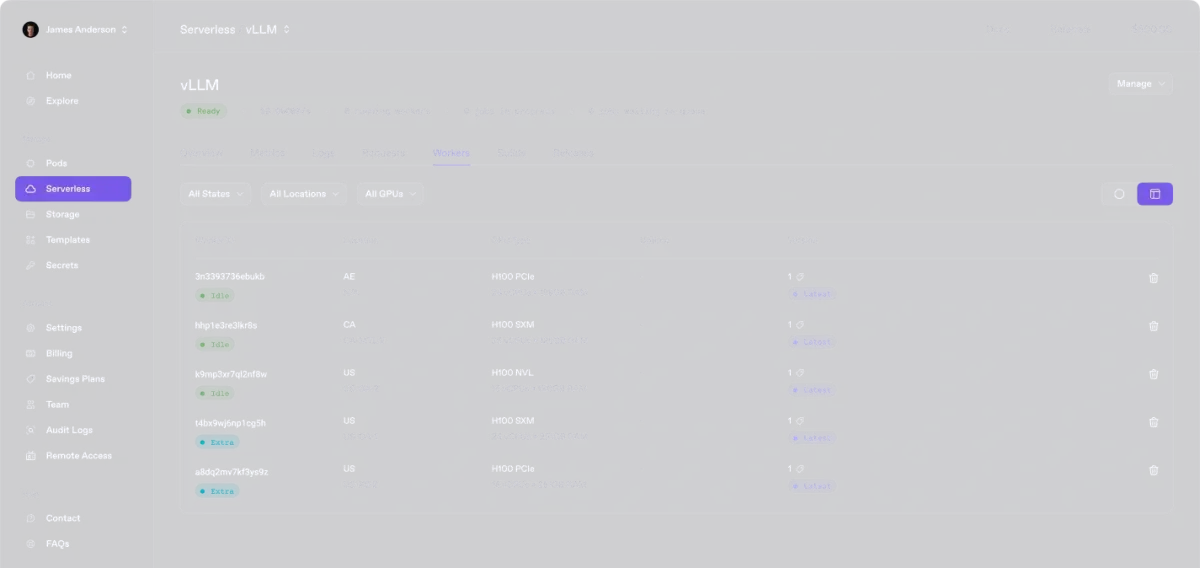
Serverless costs more per GPU-hour than a Pod, which is exactly what you would expect, because you are buying the right to stop paying. The useful question is how much idle time it takes to justify the premium. That is a single division, and nobody seems to publish the answer.
| GPU class | Secure Pod | Serverless flex | Serverless is cheaper below… |
|---|---|---|---|
| RTX A5000 / L4 / 3090, 24 GB pool | $0.27 to $0.59 | $0.69 | 39% to 86% busy |
| RTX 4090, 24 GB | $0.89 | $1.10 | 81% busy |
| RTX 5090, 32 GB | $1.19 | $1.58 | 75% busy |
| A6000 / A40, 48 GB | $0.59 | $1.22 | 48% busy |
| L40S / 6000 Ada, 48 GB | $0.99 to $1.09 | $1.75 | 57% to 62% busy |
| A100, 80 GB | $1.79 | $2.72 | 66% busy |
| H100, 80 GB | $2.89 to $3.99 | $4.79 | 60% to 83% busy |
| H200, 141 GB | $5.29 | $5.93 | 89% busy |
| B200, 180 GB | $7.99 | $8.64 | 92% busy |
| B300, 288 GB | $8.99 | $10.65 | 84% busy |
Read the last column as the point where the two bills cross. Below that utilization, Serverless wins. Above it, a Pod that you simply leave running is cheaper.
Two things fall out of that table. The first is that on the big datacenter cards the crossover sits between 84 and 92 percent, which in practice means Serverless is almost always the right answer for an H200 or a B200: you would need an endpoint busy nine seconds in every ten before a dedicated Pod paid off. The second is that on the cheap 48 GB cards the crossover drops to 48 percent, so an A6000 endpoint handling steady traffic should probably just be a Pod.
A worked example, using the RTX 4090. A Secure Cloud Pod left running for a 30 day month costs $640.80. The same card on Serverless costs $792 if it never stops, but $198 at 25 percent utilization and $79.20 at 10 percent. If your endpoint is quiet most of the day, Serverless saves you most of the bill. If it is saturated, it costs you an extra $151 a month for nothing.
One caveat that matters when you read that table. On Pods you pick a specific card. On Serverless you mostly pick a VRAM class, and several classes pool multiple models: the $0.69 tier covers L4, A5000, 3090 and the 24 GB MIG slice interchangeably. If your workload is sensitive to which chip it lands on, that pooling is a real constraint, and the dedicated PRO tiers that do name a single card cost more.
What Clusters Add, and What They Cost
Clusters are priced above Secure Pods by an almost suspiciously round margin. H200 SXM is $6.35 an hour in a cluster against $5.29 as a Pod. A100 SXM is $2.15 against $1.79. Both work out to a 20 percent surcharge, which suggests a flat multiplier rather than per-SKU pricing.

Those are the only two cluster SKUs with a published number. L40S, H100 SXM and B200 all read “contact sales,” as does every row in the reserved cluster table. What you get for the 20 percent is 1,600 to 3,200 Gbps of east-west bandwidth over InfiniBand or RoCE v2, tenant-isolated fabric, Slurm orchestration, and no minimum term. Anyone can provision two nodes and up to 16 GPUs without asking; going beyond that to the 64 GPU ceiling requires a spend limit increase.
What Runpod’s Own Usage Data Says You Should Rent
Almost every cloud GPU comparison on the web is an argument about H100s. Runpod’s own Fall 2026 usage report, drawn from its customer base, says that is not what most people run.
| Workload | Under 24 GB | 25 to 48 GB | 80 GB and up |
|---|---|---|---|
| Batch processing | 49.8% | 34.5% | 15.7% |
| Fine-tuning | 38.4% | 24.7% | 36.9% |
| Serving only | 37.1% | 33.8% | 29.1% |
| Training | 35.4% | 40.3% | 24.3% |
| Inference | 31.5% | 44.1% | 24.4% |
In four of the five categories, including training, the under 24 GB tier is the single largest or second largest share. Half of all batch processing runs on cards with less VRAM than a laptop RTX 4090 has. Only in fine-tuning does the 80 GB class come close to leading, and even there it sits behind the smallest tier.
This matters because of where the tier premiums land. The biggest Community to Secure gaps on the whole price list are on exactly the small cards that most of this usage sits on: 162 percent on the 4090, 127 percent on the 3090, 72 percent on the 5090. The pricing decision with the most leverage is the one affecting the majority of workloads, and it is the one the comparison articles skip entirely because they are all busy arguing about H100s.
The sensible move is to start one tier below where you think you need to be. Runpod’s own sizing guidance puts an LLM at roughly 2 GB of VRAM per billion parameters, which makes a 7B model about 14 GB and a 13B model about 26 GB, and notes that four-bit quantization brings a 70B model down to around 35 GB. A 24 GB card covers more than its spec sheet suggests.
The Eight Picks
Rates below are Secure Cloud first, Community Cloud in brackets, taken from the October 8 pricing page. System RAM and vCPU figures come from the same table.
1. RTX A5000, 24 GB: the cheapest VRAM on the platform
$0.27/hr ($0.16). 25 GB system RAM, 9 vCPUs.
Work out dollars per gigabyte of VRAM per hour across the whole price list and the A5000 comes first at $0.0113, narrowly ahead of the 48 GB A6000. It is an Ampere workstation card, so there is no FP8 and no Blackwell feature set, and 9 vCPUs will bottleneck anything that preprocesses heavily on the CPU. For holding a quantized 7B model resident and answering requests, none of that matters, and at $194 a month running continuously it is the cheapest way on this platform to keep something warm.
Skip it if your framework needs recent CUDA features, or your pipeline is CPU bound.
2. RTX A6000 or A40, 48 GB: the cheapest way to 48 GB
Both $0.59/hr (A6000 $0.33, A40 $0.35). Both listed at 50 GB system RAM and 9 vCPUs.
These two are listed with identical specs at an identical Secure Cloud price, which makes the choice between them a coin toss unless you are on Community Cloud, where the A6000 is two cents cheaper. At $0.0123 per GB per hour they are within a rounding error of the A5000 while giving you twice the VRAM, which makes this the tier where a 30B class model stops being a squeeze.
Skip it if you need the memory bandwidth of an L40S for throughput rather than capacity. The A6000 is the budget choice, not the fast one.
3. RTX 6000 Ada, 48 GB: 48 GB with room to work
$0.99/hr ($0.74). 167 GB system RAM, 10 vCPUs.
The 167 GB of host memory is the reason to pick this over the other 48 GB options. Nothing else at this VRAM level comes close: the L40 and L40S both list 94 GB, the A6000 and A40 list 50 GB. If your job streams a large dataset, keeps several model variants staged, or does heavy host-side preprocessing, that difference will show up long before the GPU does. It is also forty cents an hour cheaper than the L40S.
Skip it if you are purely GPU bound, in which case the extra host RAM is money you are not using.
4. RTX 4090, 24 GB: fast, popular, and the worst value per gigabyte
$0.89/hr ($0.34). 41 GB system RAM, 6 vCPUs.
This is the card most people arrive looking for, and it is genuinely the quickest 24 GB option on the list for diffusion work. It is also, on Secure Cloud, the single worst value in VRAM terms outside the SXM parts: at $0.0371 per GB per hour it costs more per gigabyte than an H100 PCIe at $0.0361. The 162 percent tier premium is what does it. On Community Cloud at $0.34 the same card is excellent value, which is precisely the problem, because that is the tier no longer taking new hosts.
Skip it if you are sizing on capacity rather than speed. Two A6000s cost $1.18 an hour and give you four times the VRAM.
5. RTX 5090, 32 GB: one step of headroom
$1.19/hr ($0.69). 35 GB system RAM, 9 vCPUs.
The 5090 exists on this list for workloads that overflow 24 GB but do not need 48. That is a narrower band than it sounds, and at $0.0372 per GB it is priced like a 4090 rather than like a step up. Where it earns its place is Blackwell support: if you need current-generation features and cannot justify an RTX Pro 6000, this is the entry point. Note that the Blackwell MIG slices Runpod sells are Secure Cloud only, so this is also one of the few ways onto that architecture cheaply.
Skip it if 24 GB fits. The premium over an A5000 is more than four times the hourly rate.
6. A100 SXM, 80 GB: take the SXM, it is the same price
$1.79/hr ($1.39). 125 GB system RAM, 16 vCPUs.
This is the clearest actionable quirk in the whole price list. On Secure Cloud the A100 PCIe and the A100 SXM are both $1.79 an hour. The PCIe version comes with 117 GB of system RAM and 8 vCPUs; the SXM version comes with 125 GB and 16 vCPUs, plus the faster NVLink interconnect that matters the moment you use more than one. Same price, double the vCPUs. On Community Cloud the gap reappears, with PCIe at $1.19 against SXM at $1.39, so there the choice is real.
Skip it if you only ever run single-GPU jobs that are not CPU bound, in which case either variant is fine and Community PCIe is the cheap route.
7. H100 PCIe, 80 GB: the H100 that is not $3.99
$2.89/hr ($1.99). 188 GB system RAM, 16 vCPUs.
The two 80 GB H100 variants are separated by $1.10 an hour, which over a 30 day month is $792. What the extra buys is SXM interconnect and four more vCPUs. What it costs you, oddly, is host memory: the cheaper PCIe listing carries 188 GB of system RAM against the SXM listing’s 125 GB, the most of any card on the board. For single-node fine-tuning that is a straightforwardly better deal, and the SXM premium only starts paying back when you are scaling across cards and the interconnect becomes the bottleneck.
Skip it if you are running distributed training, where NVLink is the entire point and the SXM part is the right tool.
8. H200, 141 GB: fitting 70B without the orchestration
$5.29/hr ($3.59). 276 GB system RAM, 24 vCPUs.
Runpod’s own guidance puts a 70B model at around 140 GB of VRAM unquantized, which is the number the H200 was built to clear on a single card. The value here is not the hourly rate, it is skipping tensor parallelism, multi-GPU debugging and the interconnect question entirely. At $0.0375 per GB it is priced close to a 4090 per gigabyte, which for a flagship is reasonable. It is also one of only two GPUs with a published Cluster rate, at $6.35 an hour, if you later need more than one node.
Skip it if a four-bit quantization of your model fits in 48 GB, which for many 70B deployments it does, at roughly 35 GB by Runpod’s own estimate. That is a $4.30 an hour difference.
What the Pricing Page Does Not Tell You
Stopping a Pod doubles what you pay for its disk
Volume disk is $0.10 per GB per month while a Pod is running and $0.20 per GB per month while it is stopped. That is not a typo in their table or mine, it is in both the pricing page and the Pods storage documentation. The logic is presumably that stopped capacity is reserved without being used, but the practical effect is counterintuitive: shutting a Pod down overnight to save on GPU time doubles the rate on its 100 GB volume from $10 a month to $20.
Network volumes do not behave this way. They stay at $0.07 per GB per month under 1 TB and $0.05 over it, running or not, and they survive the Pod being deleted. If you are going to stop and start frequently, the network volume is both cheaper and safer.
A zero balance can take your data with it
This is the most expensive sentence in the documentation, and it appears twice without emphasis. When your account balance reaches $0, Pods stop automatically. Pods with a network volume attached are stopped and their data is preserved. Pods without one are terminated, and their data cannot be recovered.
Runpod bills in five minute cycles against a prepaid balance, so this is not a theoretical edge case for anyone running an unattended job near the end of their credit. The docs point to two mitigations, low balance email alerts and auto-pay, both configured in the billing console, and the storage documentation adds its own warning that the platform “is not designed for long-term cloud storage.”
You are billed for worker time, not for results
On Serverless, the meter follows the worker, not the request. Runpod’s pricing documentation lists three billable phases: the cold start while your container boots and loads models into GPU memory, the execution itself, and the idle window after each job while the worker waits for more work, which defaults to five seconds. A worker that has fully scaled down is not billed, and neither is a job sitting in the queue with no worker available.
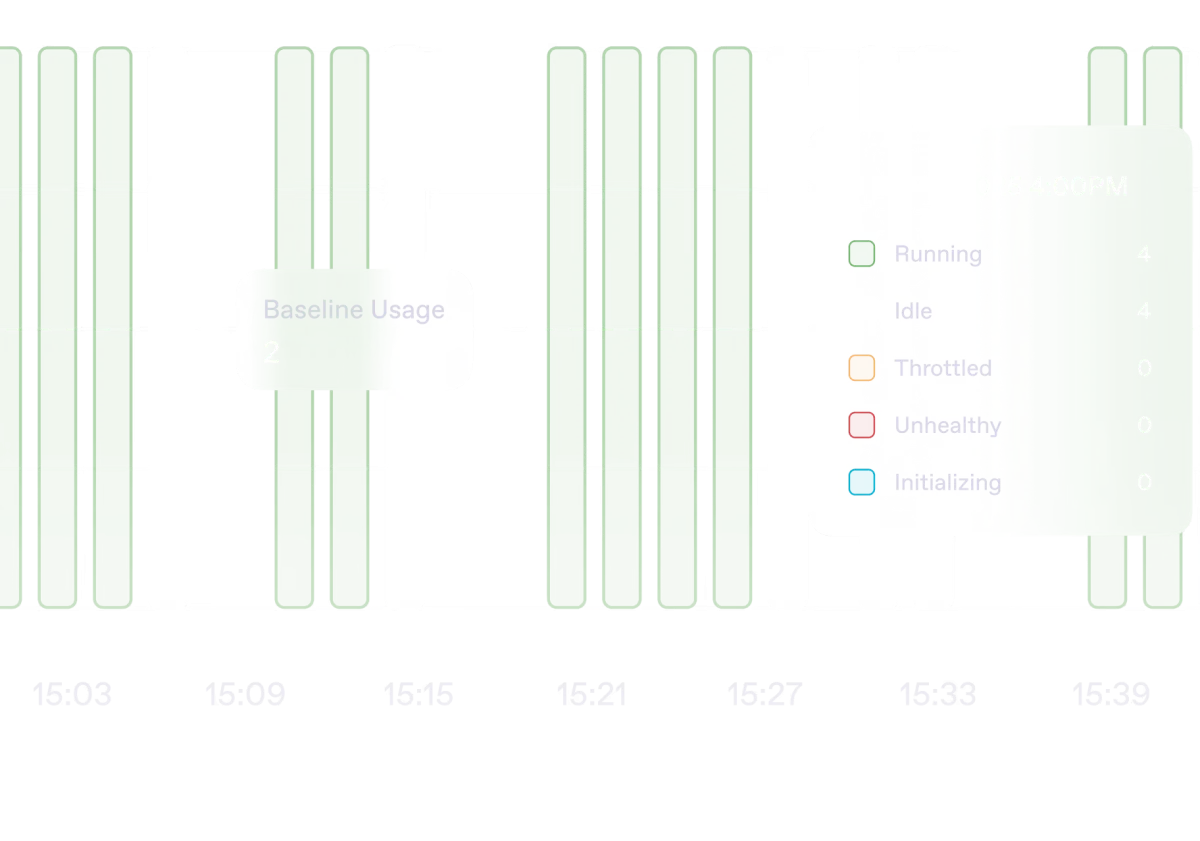
The consequence is worth stating plainly, because it is the single most common source of a surprise bill: a job that fails after nine minutes of GPU time costs exactly what a job that succeeds after nine minutes costs. A container that crashes on startup before it ever accepts work still burns the seconds it spent loading. Pulling the container image and downloading cached models happen before billing starts, which is why model caching and FlashBoot are worth configuring rather than ignoring.
Savings plans are prepaid, non-refundable, and compute only
The 3 and 6 month savings plans discount GPU compute in exchange for paying upfront. Three details are easy to miss. Storage is excluded and bills at standard rates throughout, including on stopped Pods. The plans are non-refundable with fixed expiry dates. And the discount follows the GPU type, so it reapplies automatically when you redeploy the same model of card, but buys you nothing if you switch.

There is also a default account ceiling of $80 an hour across all resources, raised only by contacting support, and a requirement to hold at least one hour of credit for your chosen configuration before an on-demand Pod will deploy at all.
More than half the GPU list has no published price
The official GPU types reference lists 45 distinct SKUs, from an RTX A2000 with 6 GB up to the B300 with 288 GB, including AMD’s MI300X and three generations of Tesla V100. The pricing page publishes rates for 21 of them. Everything else, including every 16 GB card, the RTX 4080, the RTX 5080, the A30 and the entire AMD line, is visible only once you are in the console configuring a deployment.
Serverless is the odd exception in the other direction: it publishes a 16 GB tier at $0.58 an hour covering the A4000, A4500, RTX 4000 and RTX 2000, even though Pods publishes no 16 GB rate at all.
Two Runpod pages disagree about the same chip
The Serverless product page carries a summary table marked “Updated July 2026” that gives the price range as “$0.58/hr (16GB class) to $9.98/hr (280GB B300).” The pricing page, updated October 8, lists the 280 GB B300 Serverless tier at $10.65 an hour. That is a 6.7 percent gap between two pages on the same site, and the stale one is the page a prospective customer reading about the product would land on first.
A second, smaller contradiction: the Pod selection documentation states that RTX PRO 6000 MIG slices are “available on Secure Cloud only,” while the pricing page’s structured data publishes Community Cloud rates for both the 24 GB and 48 GB MIG slices, at $0.50 and $1.00. One of those is wrong, and from the outside there is no way to tell which.
The compliance certificate covers the company, not your Pod
Runpod holds an ISO/IEC 27001:2022 certificate for its information security management system, number RUN-ISMS-20260827, issued by Sensiba LLP and valid from August 27, 2026 to August 26, 2029. It has also completed SOC 2 Type II and SOC 3 examinations and maintains HIPAA and GDPR programs, with documents available through its Trust Center on request.
Read the scope language on that page carefully, because it is unusually candid. The certificate covers “the management system, not individual products or services,” and the compliance page adds that coverage “can vary by workload, region, provider, and deployment model.” Put that next to the Community Cloud definition, peer-to-peer providers with variable reliability, and the conclusion is the obvious one: a certification held by Runpod Inc. is not a statement about the security posture of a third party’s machine in an unnamed location. If compliance is why you are buying, that is a Secure Cloud conversation, and probably a sales conversation.
Who Should Skip Runpod
Anyone who wants a predictable monthly invoice. This is a prepaid, per-second, usage-metered platform with no flat plan, and the documentation offers alerts and auto-reload rather than caps. If an unattended job can run away with your balance over a weekend, you want a provider that bills differently, or at minimum you want the $80 an hour default ceiling lowered before you start.
Anyone whose workload cannot tolerate a host disappearing and who is tempted by the Community Cloud rates anyway. The reliability of that tier is described by Runpod itself as “variable,” and the tier is closed to new hosts. Production inference does not belong there.
Anyone who needs a named, contracted compliance boundary today rather than after a Trust Center request and a sales call. The certifications are real, but the scoping language means the answer to “is my workload covered” is genuinely “it depends.”
And anyone running occasionally enough that a consumer GPU in a desktop would do. At $194 a month for a continuously running A5000, the maths favors renting when the machine is busy and favors owning when it is not. The whole case for this platform rests on paying only for the hours you use, which only helps if your usage is actually lumpy.
Frequently Asked Questions
Why does the Runpod price I see quoted elsewhere not match the pricing page?
Usually one of two reasons. Either the figure is a Community Cloud rate being presented without the tier label, which is what happens in the page description Google shows for Runpod’s own pricing page, or the article is simply old. Several comparison pages ranking for H100 and RTX 4090 rental still carry rates that do not appear anywhere on Runpod’s site today. The pricing page carries a visible “Updated” date, which makes it easy to check how fresh any third-party figure is, including the ones in this article.
What is the actual difference between Community Cloud and Secure Cloud?
Secure Cloud runs in T3 and T4 data centers with high redundancy. Community Cloud runs on peer-to-peer providers with reliability the documentation describes as variable. The price gap on the same GPU ranges from 19 percent to 162 percent. The detail most people miss is that Runpod has stopped accepting new hosts for Community Cloud, so that pool can only shrink.
Is Serverless cheaper than a Pod?
Only below a certain utilization, and the crossover varies a lot by card. On an A6000 it is around 48 percent, on an RTX 4090 around 81 percent, and on a B200 around 92 percent. Below that share of busy time, scaling to zero saves you more than the per-hour premium costs. Above it, a Pod you leave running is cheaper. Work out roughly what fraction of the day your endpoint is actually processing before you choose.
Why is my balance dropping when none of my jobs are succeeding?
Because Serverless bills worker time rather than request outcomes. The clock runs during the cold start while your container loads models into GPU memory, during execution whether the job succeeds or fails, and during the idle window after each job, which defaults to five seconds. A container that crashes 90 seconds into loading has used 90 seconds of GPU time and will never appear in your request history. Jobs sitting in the queue with no worker running are not billed.
What happens if my account balance hits zero?
Pods stop automatically. Those with a network volume attached are preserved. Those without one are terminated and the data is gone, with no recovery path documented. Runpod offers low balance email alerts and auto-pay to avoid reaching that point, and its own storage documentation advises backing critical data up elsewhere rather than treating the platform as durable storage.
Which GPU should I start with?
Smaller than you think. Runpod’s own Fall 2026 usage data shows cards under 24 GB taking the largest share of batch processing, fine-tuning and serving-only workloads across its customer base, and its sizing guidance puts a 7B model at around 14 GB and a four-bit 70B model at around 35 GB. Starting on an A5000 at $0.27 an hour and moving up when you hit a wall costs less than starting on an H100 and discovering you did not need it.
Final Thoughts
Runpod publishes more usable detail than most of its competitors. The per-second billing is real, the per-second rates are on one page with a date on them, the documentation says out loud that a zero balance can destroy data and that the platform is not durable storage, and the compliance page scopes its own certificate honestly rather than implying blanket coverage. That is a better standard of disclosure than this category usually manages.
What the pricing page does not do is make the comparison for you, and the comparison is where the money is. The same H100 is $1.99, $2.89, $3.99 or $4.79 an hour depending on which tier and which product you pick, and nothing on the page lines those four numbers up next to each other. An RTX 4090 looks cheap at $0.34 and looks like poor value per gigabyte at $0.89, and both figures are correct.
If you take three things from this guide: budget at the Secure Cloud rate because the cheap tier is closed to new hardware, work out your endpoint’s real utilization before choosing between a Pod and Serverless because the crossover is sometimes as low as 48 percent, and attach a network volume to anything you would be upset to lose. Then start a tier lower than you planned, because Runpod’s own customers mostly are.
You can compare the current rates yourself on the Runpod pricing page, which is where every figure in this article came from. If you are weighing GPU rental against a managed platform that handles the infrastructure for you, our guide to what AI app builders cost per project covers the other end of that trade, and the rest of our software and tools coverage sits alongside it.



Write Your Review
No reviews yet. Be the first to share your experience!